Whenever you are formatting your harddisk, the option for either a NTFS or a FAT file system pops up. Fine you know NTFS is new and better but how.
A file system is a part of the operating system that determines how files are named, stored and organized on a volume. FAT (File allocation table ) was the standard file system developed by microsoft for the MS-DOS. This was used in all the windows till the Windows ME. Then came the NTFS (New Technology File System) which almost replaced the FAT file allocation.
The NTFS allows greater reliability, security, greater volume size etc. In NTFS all the characteristics of the file (like filename, date of creation) are stored as metadata. NTFS utilizes the power of B+ trees to index file system data. The master file table is used to store the metadata about every file present on the volume. In this system greater security is provided as we can restrict access of files to authorized users.
These features of NTFS sure does give them a reason to be chosen while opting for the type of file system for formatting.
Associated topics :
Thursday, September 6, 2007


Monday, September 3, 2007
Rules for Creating a Relational DBMS
So all you programmer's out there think just implementing a database in the form of tables makes your database a relational Database (RDBMS). Well then E.F. Codd challanges this thought of yours. Edgar F. Codd was a british computer scientist who has given a set of 12 rules necessary for creating a relational database. Most of the database management systems like Oracle, SQL server etc. incorporate most of these rules. The rules are :
(1)Information Rule:
All information in a relational database including table names,column names are
represented explicitly by values in tables. Knowledge of only one language is necessary to
access all data such as description of the table and attribute definitions ,integrity
constraints,action to be taken when constraints are voilated,and security information.
(2)Guaranted Access Rule:
Every pieceof data in the relational database,can be accessed by using a
combination of a table name, a primary key value that identifies the row and a column
that identifies the cell.The benefit of this is that user productivity is improved
since there is no need to resort to using physical pointers addresses.Provides
data independence.
(3)Systematic treatment of Nulls Rule:
The RDBMS handles that have unknown on inapplicable values in a predefined fashion.
RDBMS distinguishes between zeros,blanks and nulls in records and handles such values in
a consistent manner that produces correct answers,comparisions and calculations.
(4)Active On-Line Catalog Based on the Relational Model.
THe description of a database and its contents are database tables and therefore
can be queries online via the data language.The DBA's productivity is improved since
changes and additionsto the catalog can be done with the same commands that are
used to access any other table.All queries and reports can be done as with other tables.
(5)Comprehensive Data Sublanguage Rule:
A RDBMS may support several languages,but atleast one of them allows the user to do all
of the following:define tables view,query and update data ,set integrity constraints,
set authorization,and define transactions.
(6)View Updating Rule:
Any view that is theoretically updatable,if changes can be made to the tables that
effect the desired changes in the view.Data consistency is ensured since changes
in the underlying tables are transmittedto the view they support.Logical data
independence reduces maintenance cost.
(7)High Level Inserts,Update and Delete:
THe RDBMS supports insertion,updation and deletion at a table level.With this the
RDBMS can improveperformance by optimizing the path to be taken to execute the action
Ease of use improved since commands act on set of records.
(8)Physical data Independence :
The execution of adhoc requests and application programs is not affected by changes
in the physical data access and storage methods.Database administrators can make
the changes to physical acccess and storage methods ,which improve performance
but do not changes in the application programs or adhoc requests.This reduces
maintenance costs.
(9)Logical data Independence:
Logical changes in tables and view such asadding/deleting columns or changing
field lenghts do not necessitate modifications in application programs or in the
format of adhoc requests.
(10)Integrity Independance:
Like table/view definitions ,integrity constraints are atored in the
on-line catalog and therefore can be changed without necessitating changes
in application programs or in the format of adhoc requests .
The following two integrity constraints must be supported.
(a)Entity Integrity:
No component of primary key is allowed to have anull value.
(b)Referential integrity:
For each distinct non-null foreign key value in a relationaldatabase,
there must exist a matching primary key from the same range of data value.
(11)Distribution Independence:
Application programs and adhoc requests are not affected by changes
in the distribution of the physical data.
(12)Nonsubversion Rule:
If the RDBMS has a language change that accesses the information
of a record at a time,this language cannot be used to by-pass the
integrity constraints.Inoreder to adhere to this rule the RDBMS must have an
active catalog that containsthe constraints must have a logical data independence.
Thursday, August 30, 2007
Minicomputers
Minicomputer is a computer which is having a size in between the mainframe computers and the microcomputers.
These minicomputers behave as a stand-alone computer with a number of terminals attached to it. They were small computers ( compared to the then existing mainframe computers ). This had been achieved with the introduction of transistors and core memory technologies.
The magnetic core memory or the ferrite core memory is a kind of computer memory. It stores information in magnetic ceramic rings which can store a bit(0 or 1) of information.

These rings are arranged in a grid form as shown.
But the minicomputers still had few drawbacks like large size, expensive to buy which gave way to the invention of the microcomputers which is visible in almost every household now a days.
Saturday, August 25, 2007
Placing a seperate hibernate button on the shut down screen
Every time you need to hibernate your OS, you need to put one of your fingers to work in pressing the shift key. Thank god there is an alternative. We can place a hibernate button alongside the standby button by performing certain tweaks in the registry.
Open regedit ( click on start > run. Then type in regedit), create a key as shown below, "HKEY_LOCAL_MACHINE\SOFTWARE\Policies\Microsoft\Windows\System\Shutdown". Then under this key create a dword value "ShowHibernateButton" and set it's value to 1 as shown "ShowHibernateButton" = dword:00000001 .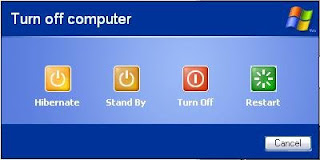
Rejoice now you can just check out your work by jumping on to the shut down screen and notice the change.
Now you will see four buttons appearing on your shut down screen. Now you will not have to bother your finger ever time you put your PC on hibernation.
Open regedit ( click on start > run. Then type in regedit), create a key as shown below, "HKEY_LOCAL_MACHINE\SOFTWARE\Policies\Microsoft\Windows\System\Shutdown". Then under this key create a dword value "ShowHibernateButton" and set it's value to 1 as shown "ShowHibernateButton" = dword:00000001 .

Rejoice now you can just check out your work by jumping on to the shut down screen and notice the change.
Now you will see four buttons appearing on your shut down screen. Now you will not have to bother your finger ever time you put your PC on hibernation.
Wednesday, August 22, 2007
Working Of LED's
LED's or Light Emmitting diodes are semiconductor devices which emit light when electricity is passed through them.  An LED consist of a p-n junction in which electricity is passed through it in forward biased mode as shown in the figure.
 Also a load resistance is applied to it so that the excess current does not harm the LED.
LED's are available in various colors to suit your need like red,blue,yellow,white etc. But the white and blue LED's are particularly costlier compared to the other colored LED's.
These LED's are tiny bulbs which can be used for various purposes like in calculators. Most significant use is the one in seven segment display, the one we see on our watches. These small bulbs are arranged in a particular pattern to create a beautiful display of a number.
There also exist the bi-colored and tri-colored LED's. So just check out the various available LED's and create something innovative out of it.
Associated Links :
 An LED consist of a p-n junction in which electricity is passed through it in forward biased mode as shown in the figure.
 Also a load resistance is applied to it so that the excess current does not harm the LED.
LED's are available in various colors to suit your need like red,blue,yellow,white etc. But the white and blue LED's are particularly costlier compared to the other colored LED's.
These LED's are tiny bulbs which can be used for various purposes like in calculators. Most significant use is the one in seven segment display, the one we see on our watches. These small bulbs are arranged in a particular pattern to create a beautiful display of a number.
There also exist the bi-colored and tri-colored LED's. So just check out the various available LED's and create something innovative out of it.
Associated Links :
Sunday, August 19, 2007
Plasma Display
We all want to have a Flat screen, large size TV hanging in our living room. These flat screen televisions use either the LCD display or the Plasma display technology. I have already talked about the LCD display in my last post. Here I will stress on the Plasma display.
A plasma display consist of two glass panels holding an inert(that is, the gases do not react) mixture of noble gases(neon and xenon). These gases are exited by electricity converting them into plasma(ionized gas). This plasma then excites the phosphors to emit light which in turn lights up the pixels.
The pixel is a point which make up the entire screen. This pixel is in turn divided into a three subpixels. In a Plasma screen each subpixel can produce millions of colors. With the combination of all such pixels we get the so-called perfect picture quality.
Associated Links :
Thursday, August 16, 2007
Technology behind LCD
LCD(Liquid crystal display) is a technology which is now fast being used in the monitors for the desktop PC's and already being used in the laptops. LCD consist of a thin liquid crystal gel sandwiched between two thin polarized materials. This gel is divided into small dots called as pixels. In order to darken a pixel the pixel is polarized 90 degrees to the polarizing screen. For a bright pixel the polarization is 0 degrees.
Related Topics :
Cleaning an LCD TV
Free LCD TV
 crystal gel sandwiched between two thin polarized materials. This gel is divided into small dots called as pixels. In order to darken a pixel the pixel is polarized 90 degrees to the polarizing screen. For a bright pixel the polarization is 0 degrees.
Related Topics :
Cleaning an LCD TV
Free LCD TV
Monday, August 13, 2007
Scheduling a computer for shut down
The computer is downloading a heavy file, and you are getting late for the work. If this is the situation we certainly have to schedule the computer to shut down after some time. Here, the Task Scheduler( you can find it under Start>Programs>Accessories>SystemTools ) comes in handy.
To shut down the system at a specific time
To shut down the system at a specific time
- Open Task Scheduler and double click Add Scheduled Tasks
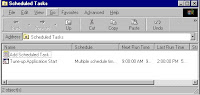

- A wizard opens, click next. You will be presented with a list of programs you can schedule to run.
- Click on browse, locate the %SystemRoot%\System32 folder. Then find the file named Shutdown.exe and click open.
- Specify a name for the task and when do you want the task to run. Click next.
- Specify the starting date and time and click next.
- Then you will be prompted to enter the user name and password. Supply the information and click finish.
- Now you are done with the process of scheduling the computer to shut down and can go to your work without worrying about terminating the download.
Friday, August 10, 2007
Get your voice on Air ( Internet Radio )
You like listening to radio, so do I. But how many of us have ever tried to broadcast our voice over the internet radio. There are a few websites that allow us to create our own online radio station and broadcast our voice. One such radio broadcaster is Live365.
Live365 is an internet radio provider in which members can create their own radio station and air your voice over it. You can also listen to other such members you have uploaded their voices. To get such access you have to purchase the "Broadcaster's" membership. Different packages are available to choose from depending on your requirements. In the very basic package, one can upload an MP3 file created by him, which will be relayed on the internet. Advanced members can upload the music at their home by getting handy a microphone. Get a quick access to Live365. So, if you think you play an instrument good enough or your voice is worth listening to, just start broadcasting your voice and see fame coming your way.
Live365 is an internet radio provider in which members can create their own radio station and air your voice over it. You can also listen to other such members you have uploaded their voices. To get such access you have to purchase the "Broadcaster's" membership. Different packages are available to choose from depending on your requirements. In the very basic package, one can upload an MP3 file created by him, which will be relayed on the internet. Advanced members can upload the music at their home by getting handy a microphone. Get a quick access to Live365. So, if you think you play an instrument good enough or your voice is worth listening to, just start broadcasting your voice and see fame coming your way.
Tuesday, August 7, 2007
Recovering files deleted from the Recycle bin
Have you lost an important file from your hard drive, then this content is for you. Whenever a delete a file using Shift+delete or deleting the files in the recycle bin, most of us consider to be that file a thing of past. But we can rejoice for it can still be recovered.
Whenever we delete a file using the above said methods, the file is not deleted rather that file is removed from the list of files in the folder and the memory area in which the file is stored is available to windows to write something else. So, longer the period since when you have deleted the file, lesser will be the chance of it being recovered.
Defragmentation frees the space occupied by such deleted files, so if you have defragmented your hard-disk recently, you can forget the idea of recovering your file. There are many tools that help you recover your files, some are paid and some for free. So here is one such free tool named "Restoration". It helps you recover the deleted files with ease. Just give it a try.
Subscribe to:
Posts (Atom)